January 2026 Enhancements (Jan 26, v18.1)
We've made editing and adding manual data more convenient: Auto-save is here!
While it may not seem like a large thing at first, not needing to hunt down and press a Save button, followed by Close, can save a second (that's 1000 millisecond!) on each edit. When doing data tweaks on a few dozen images, this adds up and makes for a more pleasant and smoother experience.
How it works
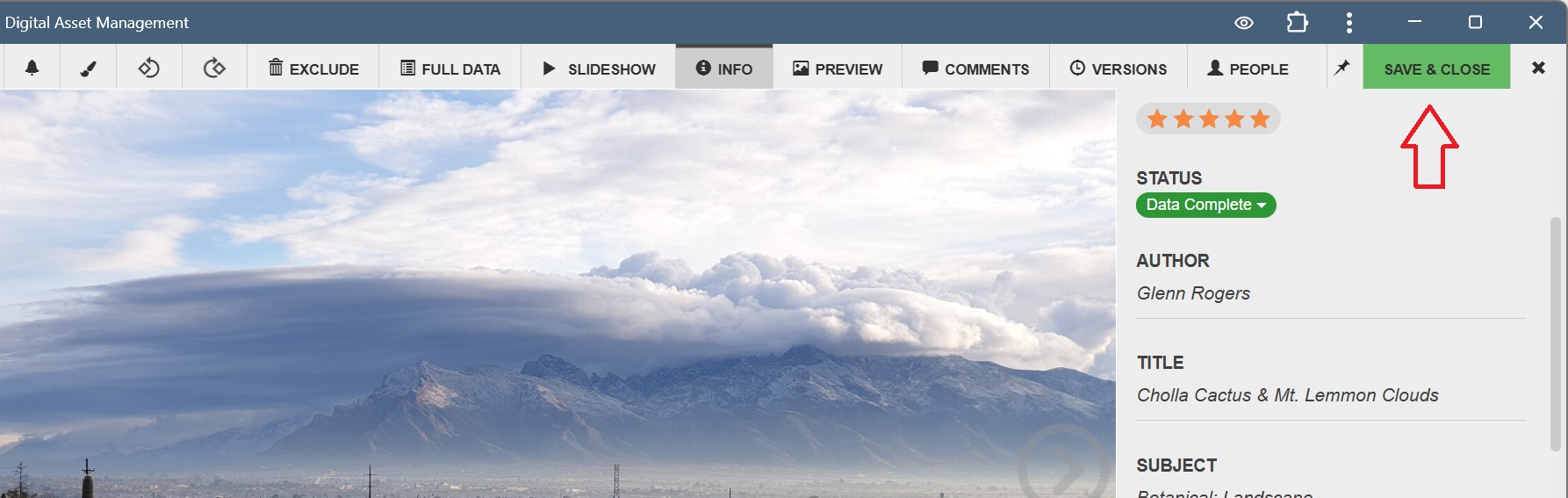
- First, we've combined the Save button and the Close button into a single "Save & Close" button (see screenshot). This is a big improvement over needing to press a Save button in the top left corner, then needing to move to the far right to press Close or the next arrow.

- Secondly, when pressing the Next and Previous arrow buttons, data will be saved automatically. This is a user setting; to enable it click the checkbox that pops up the first time you make a change and press the Next or Previous buttons.
Smaller but notible updates
- Comments can now be seen by everyone, even on public shares. This provides an additional conversation opportunity. Requires a Preferences setting: Comments "Anyone (including shared images)".
- Improved support for large RAW files such as .NEFs.
- Improved support for .mxf and .mts video files.
Tiny Items and Fixes
- We now prevent Share Management from getting a little messy by NOT creating Share links, nor entries in Share Management, until "Save and copy link" is pressed when in the Share configuration windows.
- The "Show Password" button is now always available on the login page.
- Fixed the ''Most Active Users'' widget on the dashboard: clicking a name now displays that users' activity in the audit trail when there are multiple words in the user name.
- Fixed an issue with global Data Layout Settings where it wasn't being correctly set as the default for other users.
Related Links
- Supported file formats (full list) to see all RAW and Video files supported.