AI in Digital Asset Management: What DBGallery Offers Now — and What’s Next
Enhancing Productivity with AI
DBGallery continues to expand its AI capabilities with a clear goal: reduce manual metadata work, make visual assets easier to discover, and help users understand large collections faster.
Ultimately becoming an AI knowledge layer for your visual assets.
Since this article was originally published in Autumn 2024, several capabilities discussed as upcoming have already been released, including AI-generated descriptions, text recognition, facial recognition and AI video analysis.
- Retrieval-Augmented Generation (RAG)
- Natural Language Search
These capabilities will make it possible to ask broader questions about an entire asset library using normal conversational language.
AI Capabilities Available Today
DBGallery already includes a growing set of AI and intelligent features designed to reduce metadata entry, improve search, and make visual content easier to understand and reuse.
Object Recognition
Since 2018, DBGallery has used AI to automatically identify and tag common objects in photos. This reduces the amount of metadata users need to enter manually and immediately improves discoverability.
Custom-Trained AI Object Detection
For organizations with specialized content, DBGallery can use custom-trained AI models tailored to specific object-detection needs, such as products, construction elements, materials or other organization-specific visual content.
Learn about Custom-Trained AI →AI-Generated Image Descriptions
DBGallery can automatically generate detailed descriptions of images, typically during upload. These descriptions become searchable metadata and substantially expand the information available for finding an asset.

This image, the Museum of the Future, showcases a remarkable piece of public art set against the backdrop of a modern cityscape. The focal point is a large, ring-shaped sculpture covered in intricate Arabic calligraphy.
The silvery structure reflects sunlight against the blue sky, while contemporary glass skyscrapers form a dynamic urban backdrop.
These descriptions are stored alongside the asset’s other metadata, making images discoverable using concepts, locations, settings and other details that may never have been manually entered.
Users can also provide their own prompts to customize how descriptions are generated.
AI-generated Descriptions →Facial Recognition

DBGallery's facial recognition capabilities help organizations identify and find people appearing throughout large image collections.
Because facial information has privacy implications, the capability is optional and can be enabled according to an organization’s requirements and policies.
Facial Recognition →Text Recognition (OCR)
Text Recognition, also known as image-to-text or OCR, extracts visible text from images and adds it as searchable metadata.
Useful examples include:- Company logos: find images containing a company or brand name.
- Business cards: search for names, organizations or printed information.
- Street signs and handwritten text: make visible text searchable.
- Photos of documents: expose previously inaccessible text to search.
- PDF Documents: read the entire contents of PDFs.
Understand Video Without Watching Every Minute
DBGallery's AI video capabilities help teams understand, search and navigate video assets without manually reviewing every minute of footage.
Spoken content becomes searchable metadata.
Jump directly to the relevant moment in the video from the transcription.
Visual scenes can be described even when a video contains little or no speech.
Quickly understand the overall content of longer videos.
Objects appearing in video can be identified and added to metadata.
More Intelligent Asset Management
These features do not necessarily depend on the latest generative AI models, but they still provide significant improvements in DAM productivity.
Reverse Geocoding
Automatically enrich photos with address and location information.
Smart Search
Prioritizes search results based on relevance.
Find Related Images
Surfaces visually or contextually related assets.
What’s Next
Building on the metadata DBGallery already creates and manages, the next stage is making it possible to ask broader questions across entire asset libraries using natural language.
Retrieval-Augmented Generation (RAG)
RAG will allow DBGallery to use the metadata contained throughout an asset collection to answer much broader questions.
Importantly, metadata rather than the original images can be supplied to the AI model for these types of queries.
In one test, DBGallery supplied the metadata from a photographer's collection spanning roughly 30 years. The system successfully identified equipment from Olympus, Canon and Samsung and summarized how the photographer’s equipment changed over time.
Natural Language Search
Instead of requiring users to know which fields contain information or how advanced search options work, users will be able to ask questions conversationally.
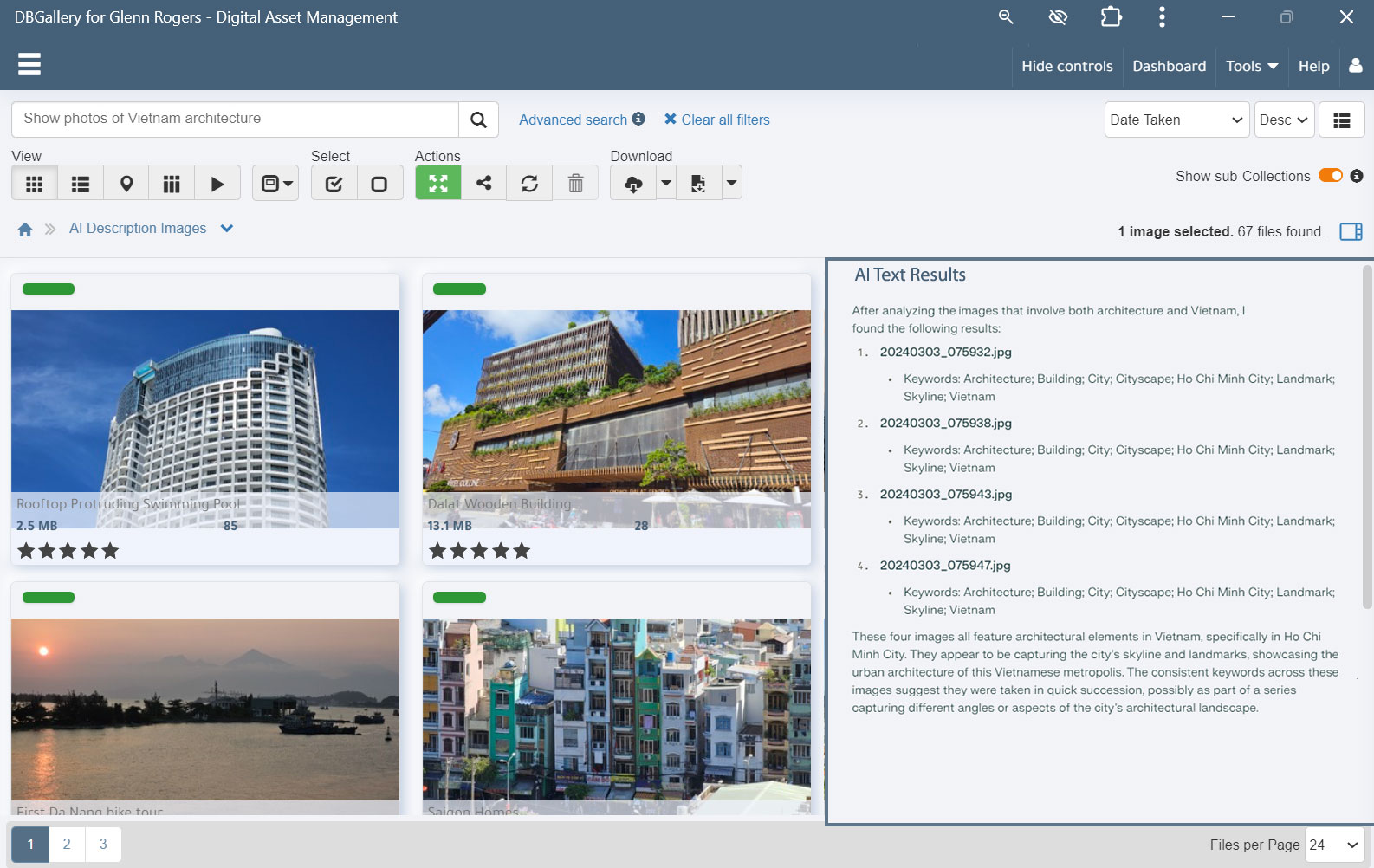
From Search to Actions
Natural-language capabilities will eventually be extended beyond finding information and become another way to perform actions within the DAM.
AI That Adds Value to Metadata
The common thread across these capabilities is metadata enrichment.
AI descriptions, recognized text, detected objects, identified faces, video transcripts and other intelligence become part of the information associated with an asset.
That makes content easier to discover today and increases the long-term value of the library. The metadata can continue providing value when assets are searched, shared externally, reused on websites, or accessed years after they were originally uploaded.
Organizations can enable capabilities according to their workflows, security requirements and privacy policies.
Frequently Asked Questions
Can DBGallery's AI capabilities be customized for specific industries?
Yes. DBGallery supports custom-trained AI object detection, allowing organizations to create recognition models for specialized content such as products, architectural features, construction materials, defects, or other organization-specific objects.
One example is Lane Consulting Services, where custom-trained AI was used to recognize apartment-building features and defects used in Physical Needs Assessment reports and Facilities Studies.
How do these AI capabilities affect data privacy?
When cloud-based AI services are used, assets may be sent to the relevant AI provider for processing. DBGallery publishes information about its providers and their Data Processing Agreements on its Terms and Conditions page.
AI capabilities with privacy implications can be enabled according to each organization’s policies and requirements.
How long does it take to set up a custom-trained AI model?
Training is the most time-intensive part of the process and can take anywhere from several days to months depending on complexity, available training data, and desired accuracy.
Once a model is trained, integrating it with DBGallery is comparatively straightforward.
How are faces tagged?
A person only needs to be named once. DBGallery can then propagate that identity to the other images where the same face has been recognized, and future uploads can automatically use that name.
An AI Knowledge Layer for Your Visual Assets
See how DBGallery turns visual content into searchable metadata, descriptions, detected objects, recognized text, video transcripts and more.
Explore More DBGallery AI →